Quickstart
This guide will help you get started with VegasAfterglow quickly. We’ll cover basic installation, setting up a simple model, and running your first afterglow parameter estimation.
Installation
The easiest way to install VegasAfterglow is via pip:
pip install VegasAfterglow
For MCMC fitting, install with the mcmc extra:
pip install VegasAfterglow[mcmc]
For more detailed installation instructions, see the Installation page.

Basic Usage
VegasAfterglow is designed to efficiently model gamma-ray burst (GRB) afterglows and perform Markov Chain Monte Carlo (MCMC) parameter estimation.
Direct Model Calculation
Before diving into MCMC parameter estimation, you can directly use VegasAfterglow to generate light curves and spectra from a specific model. Let’s start by importing the necessary modules:
import numpy as np
import matplotlib.pyplot as plt
from VegasAfterglow import ISM, TophatJet, Observer, Radiation, Model
Then, let’s set up the physical components of our afterglow model, including the environment, jet, observer, and radiation parameters:
# 1. Define the circumburst environment (constant density ISM)
medium = ISM(n_ism=1) # in cgs unit

# 2. Configure the jet structure (top-hat with opening angle, energy, and Lorentz factor)
jet = TophatJet(theta_c=0.1, E_iso=1e52, Gamma0=300) # in cgs unit

# 3. Set observer parameters (distance, redshift, viewing angle)
obs = Observer(lumi_dist=1e26, z=0.1, theta_obs=0) # in cgs unit

# 4. Define radiation microphysics parameters
rad = Radiation(eps_e=1e-1, eps_B=1e-3, p=2.3)

# 5. Combine all components into a complete afterglow model
model = Model(jet=jet, medium=medium, observer=obs, fwd_rad=rad)
Tip
The API expects CGS base units (seconds, Hz, cm, radians). Use the VegasAfterglow.units module for convenient conversion:
from VegasAfterglow.units import Mpc, deg, GHz, day, mJy

obs = Observer(lumi_dist=100*Mpc, z=0.1, theta_obs=5*deg)
flux = model.flux_density_grid(times * day, np.array([5*GHz]))
flux_mJy = flux.total / mJy  # convert output to mJy
Light Curve Calculation
Now, let’s compute and plot multi-wavelength light curves to see how the afterglow evolves over time:
# 1. Create logarithmic time array from 10² to 10⁸ seconds (100s to ~3yrs)
times = np.logspace(2, 8, 200)

# 2. Define observing frequencies (radio, optical, X-ray bands in Hz)
bands = np.array([1e9, 1e14, 1e17])

# 3. Calculate the afterglow emission at each time and frequency
results = model.flux_density_grid(times, bands)

# 4. Visualize the multi-wavelength light curves
plt.figure(figsize=(4.8, 3.6), dpi=200)

# 5. Plot each frequency band
for i, nu in enumerate(bands):
    exp = int(np.floor(np.log10(nu)))
    base = nu / 10**exp
    plt.loglog(times, results.total[i,:], label=fr'${base:.1f} \times 10^{{{exp}}}$ Hz')

# 6. Add annotations for important transitions
def add_note(plt):
    plt.annotate('jet break',xy=(3e4, 1e-26), xytext=(3e3, 5e-28), arrowprops=dict(arrowstyle='->'))
    plt.annotate(r'$\nu_m=\nu_a$',xy=(6e5, 3e-25), xytext=(7.5e4, 5e-24), arrowprops=dict(arrowstyle='->'))
    plt.annotate(r'$\nu=\nu_a$',xy=(1.5e6, 4e-25), xytext=(7.5e5, 5e-24), arrowprops=dict(arrowstyle='->'))

add_note(plt)

plt.xlabel('Time (s)')
plt.ylabel('Flux Density (erg/cm²/s/Hz)')
plt.legend()
plt.title('Light Curves')
plt.tight_layout()
plt.savefig('assets/quick-lc.png', dpi=300)
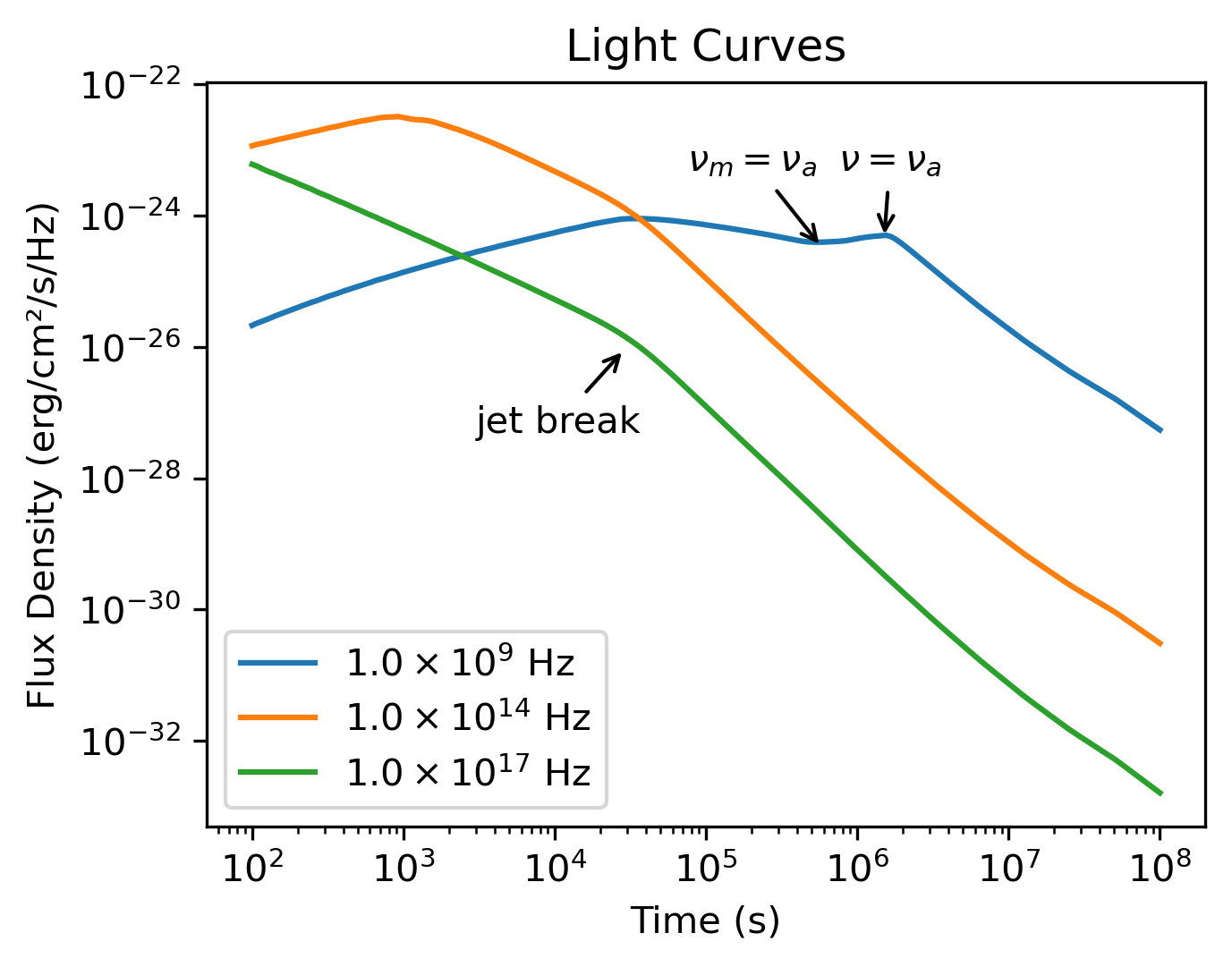
Running the light curve script will produce this figure showing the afterglow evolution across different frequencies.
Spectral Analysis
We can also examine how the broadband spectrum evolves at different times after the burst:
# 1. Define broad frequency range (10⁵ to 10²² Hz)
frequencies = np.logspace(5, 22, 200)

# 2. Select specific time epochs for spectral snapshots
epochs = np.array([1e2, 1e3, 1e4, 1e5, 1e6, 1e7, 1e8])

# 3. Calculate spectra at each epoch
results = model.flux_density_grid(epochs, frequencies)

# 4. Plot broadband spectra at each epoch
plt.figure(figsize=(4.8, 3.6),dpi=200)
colors = plt.cm.viridis(np.linspace(0,1,len(epochs)))

for i, t in enumerate(epochs):
    exp = int(np.floor(np.log10(t)))
    base = t / 10**exp
    plt.loglog(frequencies, results.total[:,i], color=colors[i], label=fr'${base:.1f} \times 10^{{{exp}}}$ s')

# 5. Add vertical lines marking the bands from the light curve plot
for i, band in enumerate(bands):
    plt.axvline(band, ls='--', color=f'C{i}')

plt.xlabel('Frequency (Hz)')
plt.ylabel('Flux Density (erg/cm²/s/Hz)')
plt.legend(ncol=2)
plt.title('Synchrotron Spectra')
plt.tight_layout()
plt.savefig('assets/quick-spec.png', dpi=300)
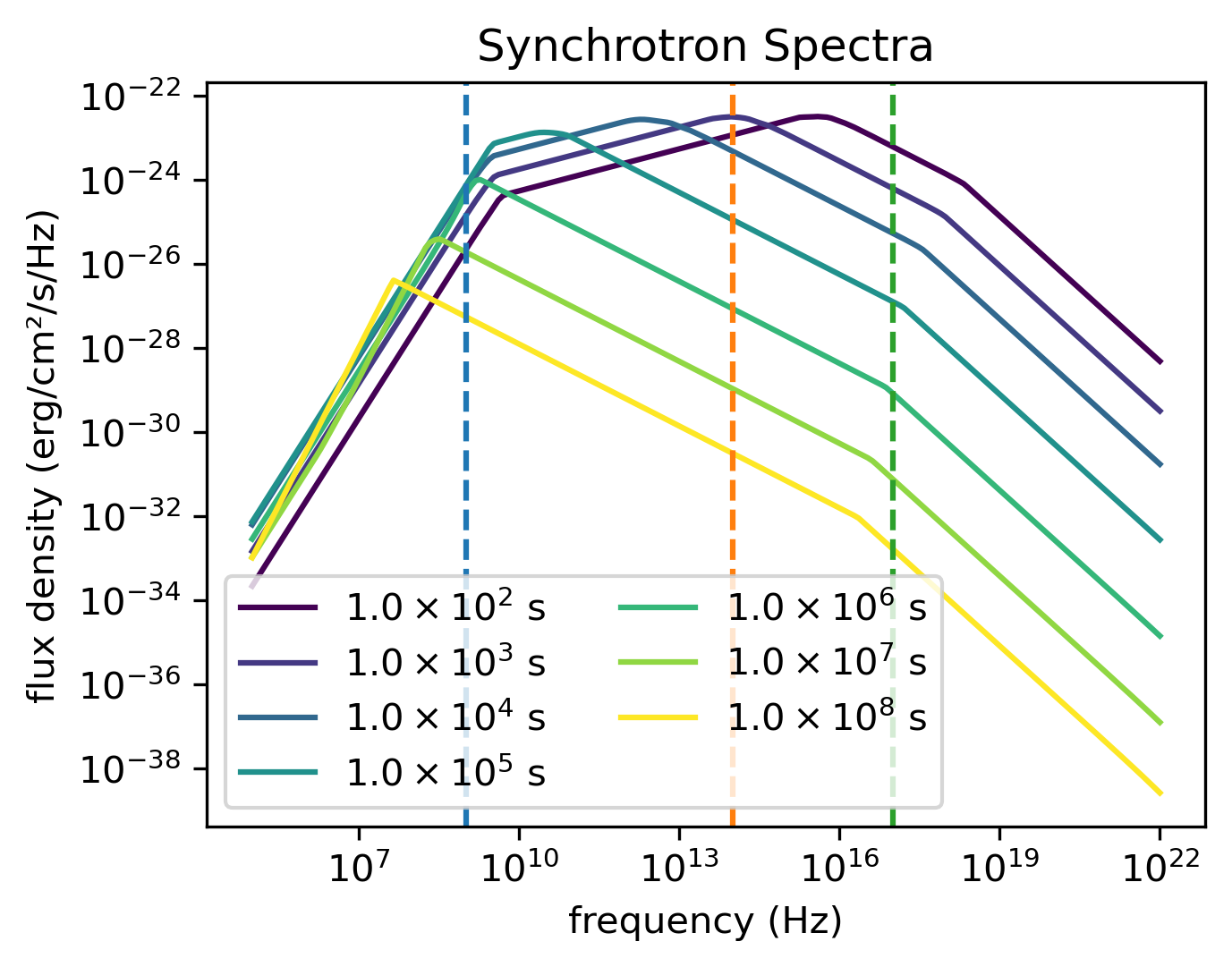
The spectral analysis code will generate this visualization showing spectra at different times, with vertical lines indicating the frequencies calculated in the light curve example.
Parameter Estimation with MCMC
VegasAfterglow includes a powerful MCMC framework for fitting afterglow model parameters to observational data.
Note
MCMC fitting requires additional dependencies. Install them with:
pip install VegasAfterglow[mcmc]
Here is a minimal example showing the complete workflow:
import numpy as np
from VegasAfterglow import Fitter, ParamDef, Scale

# 1. Create fitter with model configuration
fitter = Fitter(z=1.58, lumi_dist=3.364e28, jet="tophat", medium="ism")

# 2. Add observational data
fitter.add_flux_density(nu=4.84e14, t=t_data, f_nu=flux_data, err=flux_err)
fitter.add_spectrum(t=3000, nu=nu_data, f_nu=spec_data, err=spec_err)

# 3. Define MCMC parameters
mc_params = [
    ParamDef("E_iso",    1e50,  1e54,  Scale.log),
    ParamDef("Gamma0",      5,  1000,  Scale.log),
    ParamDef("theta_c",   0.0,   0.5,  Scale.linear),
    ParamDef("theta_v",   0.0,   0.0,  Scale.fixed),
    ParamDef("n_ism",    1e-3,    10,  Scale.log),
    ParamDef("p",           2,     3,  Scale.linear),
    ParamDef("eps_e",    1e-2,   0.5,  Scale.log),
    ParamDef("eps_B",    1e-4,   0.5,  Scale.log),
]

# 4. Run MCMC
result = fitter.fit(mc_params, sampler="emcee", nsteps=10000,
                    nburn=2000, npool=8, resolution=(0.1, 0.25, 10))

# 5. Inspect best-fit parameters
print("Best-fit params:", result.top_k_params[0])

# 6. Generate predictions with best-fit model
lc = fitter.flux_density_grid(result.top_k_params[0], t_out, bands)
For the full guide including data selection strategies, custom jet/medium factories, multiple sampler options, and result analysis, see MCMC Parameter Fitting.
Next Steps
Examples – detailed examples including internal quantities analysis and model introspection
MCMC Parameter Fitting – comprehensive MCMC fitting guide
Parameter Reference – parameter documentation and typical ranges
GRB Afterglow Physics – underlying physical models and equations
Troubleshooting – common issues and solutions